Posts

Showing posts with the label node js

Getting started with React native

Image
It's been a long time since i have posted anything in this blog. I have been trying react-native for the last 3 months. And it's been a wonderful experience. From a Angular background it seemed difficult to adopt react initially. Once i got it, it seems very easy and interesting. About the performance of RN is just awesome. I am using Windows 10 Android Installation Installation is pretty simple. There are two ways to create an application, using expo-cli and react-native-cli. I prefer the second one. It seems like a little complex but when developing large application it's the best way to start. Setup As a prerequisite we need to install nodeJS, Python, JDK and need to setup Android. We need to install react-native-cli globally for creating and running the project npm install -g react-native-cli Running Once you install the cli we can create the application. react-native init firstProject After creating the application we can move into the application...

RequireJS: More with templating - Dynamic data

Find the previous  episode here . Checkout the part 3 branch git checkout -b part4.0 origin/part4.0 Lets change the templating a bit different so that we could add data to the template. Now if we click on a link other than home everything will be gone. So we will move the link list to the index before maincontent so that it will always remain there. Next we will replace the modules/home/Home.html with some dummy text. The index.html wil looks like this <div>   <ul>     <li><a href="#home">Home</a></li>     <li><a href="#employee">Employees</a></li>     <li><a href="#project">Projects</a></li>   </ul> </div> <div id="maincontent">   </div> Next we will add some more dummy content to other template html file in projects and employees . And also change the controllers to load and how the content. And also we need to...

RequireJS: More with modules - Templates

Find the previous  episode here . Checkout the part 3 branch git checkout -b part3.0 origin/part3.0 We have created the routing and added a test module to the application. Lets try to add more to module. Templating          Am going to use RequireJS "Text" plugin for templating along with  Underscore.js and Jquery Text     An AMD loader plugin for requireJS to load text resouces. We will load html using text. Underscore.js     " Underscore  is a JavaScript library that provides a whole mess of useful functional programming helpers without extending any built-in objects. " underscore provides a powerfull templating option. You could try lodash also which is a fork of UnderscoreJS Let's do some coding now. First we need to create a template in html. We will extract this code from index.html and will create a new html in modules/home/templates/home.html <div> <ul> <li><a href="#home">Hom...

RequireJS: Application routing

Find the previous episode here . Checkout the part2.0 branch git checkout -b part2.0 origin/part2.0 In this section we will look into how a routing can be done. For this we are using another lightweight routing framework Page.js .  First install it using bower. bower install visionmedia/page.js We already had added the page in config.js. Now we need to create a router.js which will be in router folder.   define(['page'], function(page) { }); We will create a blank module with loading the page framework. Here we use the Module ID for the module which we defined in config.js. You could use the url also like "bower_components/page/page" But it would be better if a module id us used. NOTE: In requireJS the .JS extension will not be used. Next we will require the router module in app.js. define(['config'], function(config) { "use strict"; require(['router/router']); }); This will load the router module after loading the c...

RequireJS: Getting Started

Modular programming helps to divide the application code based on the module. These programming style helps to manage as well develop the application easily. Requirejs is lightweight framework used in javascript to develop applications using the modular programming. RequireJS RequireJS is lightweight javascript framework which enables AMD(Asynchronous Module Loader). RequireJS helps to load javascript file and modules asynchronously. Apart from using in browser , it’s also be used alongside in Node projects. Why RequireJS? It’s lightweight, scalable, comes with an excellent optimising tool. Apart from these the use of  RequireJS comes handy when you need to divide and load javascript files and modules whenever they need. Suppose you had an application which have a home page, employees, and projects module. And had 3 javascript files like home.js, employees.js and projects.js. Normally in single page application you need to load these files when the page loads. L...

MEAN js adding a CRUD module

Image
it's continuation of previous post . Lets try to add  a new CRUD module to the app. First create a new module using the yo generator. We will create a new module to add a company name and it's location. yo meanjs:crud-module company It will ask some questions. Need to specify angular folders. Select all those. Next it will ask about menu. whether it need to be added or not. type 'Y' so it will create those links. So the module is loaded. If you check the app folder you will find some new files in the app. Currently it had option to add the name only. We will add location also. Lets edit that. Navigate to  model app/models/ and open company.server.model.js . This file consist the model of the module 'company'. This will define the mongoose schema . Lets add properties for this schema. var mongoose = require('mongoose'), Schema = mongoose.Schema; var CompanySchema = new Schema({ name: { type: String, default: '', req...

MEAN js Application structure

It's a continuation of previous post . Lets discuss about the application structure in a MEAN.js Application. Actually MEAN follows a MVC(Model-View-Controller). There are mainly two types of application structure for MVC. 1. Horizontal Folder Structure         This type of structure follows the division on functional role rather than the feature.The files and folders will kept inside a application folder .  There will be one controller folder for all application controllers. Horizontal structure is for simple projects where the features were limited. An example for this structure is app ----controllers ----models ----routes ----views config ----env ----strategies ----config.js ----express.js public ----config ----controllers ----directives ----css ----filters ----images ----views ----services server.js package.json app folder consists of all the express.io files or the server side files. app/controllers folder holds all express controller logic. a...

Getting Started with MEAN.js

Image
Recently am into Javscript development like node, angular etc. And i came across this awsome stack just like WAMP . It's called MEAN and am so much excited about this stack. MEAN stands for  Mongodb ]- The Database Express - The serverside framework Angular - The Client side MVC framework Node.js - the server or the server side runtime There are two major MEAN generators availbale , MEAN.js and MEAN.io . Both gives a kickstart  in MEAN development. But note than MEAN stack development is possible without these.  Both are theoratically same and uses same technologies and also developed by same guy, Amos Haviv . Am write down my "Getting started" experience with MEAN.js.  For MEAN.js you need these technologies installed. Node.js Git Mongodb After installing these , open a terminal and type: npm install -g grunt-cli Next Install bower npm install -g bower Next install yeomen generator npm install -g generator-meanjs ...

Save image from Flash using Node.js and Socket.io

Image
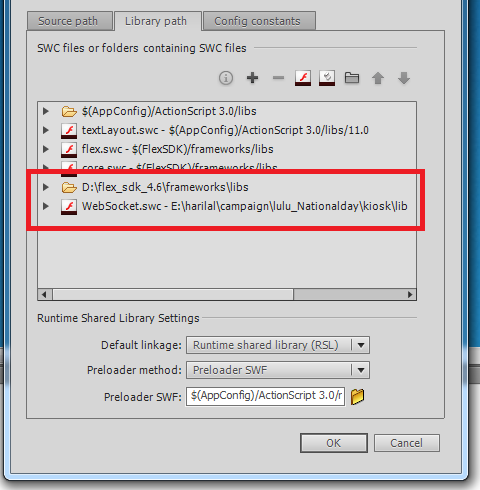
I have been working on Node.js and Actionscript 3.0 for couple of day. I have searched everywhere for help to connect socket.io and flash. But i couldn't find anything decent. Most of them where outdated. Lets' check the requiremnts Node.js Socket.io 0.6 FlashSocket FlexSdk Flash IDE Before starting i would like say something about version. Flashsocket din't work on latest socket.io and i couldn't work out any solution. And also FlashSocket need FlexSdk and also websocket .  Node js  First install socket.io in to the application directory .Note the version it's 0.9 npm install socket.io@0.9 The server code will be like this var app = require('http').createServer(handler) , io = require('socket.io').listen(app,{transports:['flashsocket', 'websocket', 'htmlfile', 'xhr-polling', 'jsonp-polling']}) , fs = require('fs'); var port = Number(81); app...