Posts

Showing posts with the label Adobe

Customise Combobox/DropDown in Flash

I am always wonder how to customise the Combobox component in Flash . It's easy to change the skin. Simply double click the component , enter each movieclip and change the style. But ever wonder how to change text color and it's position. I will try to point out step by step procedure for customise it. 1. First create a class which extends ComboBox. I used  DropDownComboBox for class name. 2. Second create another class for Cell render which extends  CellRenderer. I used DropDownCellRenderer; 3. Open a new flash document  and insert a combobox component in the stage. 4. Select ComboBox clip in the library. Right click on it and select Properties.   5. In the properties panel change the default Class to the custom class you wrote . ie,  DropDownComboBox  6. Inside the DropSownComboBox constructer function type this code  dropdown.setStyle('cellRenderer', DropDownCellRenderer); 7. If you need to change the Text of ComboBox...
Font embedding in Flash cs5

Image
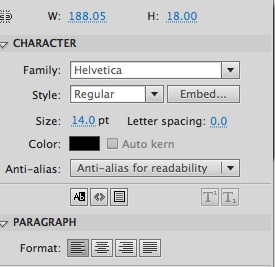
When i switched to Flash CS 5 am always confused with font embedding in Dynamic Textfield. It's different from CS4 and also not simple. So i am trying to list out the methods i used to embed fonts in flash CS Method One It's used to embed fonts for single or similar type of textfields. If the textfields were using same font and format this is effective. To do so first select the TextField and goto the properties panel. select the embed button . It will open embed window. select the glyphs needed. In this method any additional code is not needed. Method Two If you tried to embed same font with different textformat using the above method , most probably the format will not be applied. To solve this the subset of the fonts should be embedded and need format textfield using TextFormat. The code looks like this: var format:TextFormat = new TextFormat(); format.font = "Helvetica"; format.bold = true; var format3:TextFormat = new TextForm...

External models in Papervision3D

I think am taking a bit more interest in Actionscript 3.0 . Coz now am trying Papervision3D . The thing attracted me most is the loading of external model to flash . So i searched google and got this book. http://blog.papervision3d.org/2009/09/03/papervision3d-essentials/ I got what am looking for , in the free chapter . First i can't understand a word from that .Coz i have little exposure in 3D. So i worked with my genius designer and after a a long struggle am able to load the external models to flash. I decided to document the steps. For this you need these 1. Flash professional 2. Autodesk 3D studio 3. Papervision3D http://blog.papervision3d.org/ 4. Collada plugin You can use 2 plugin's one is from here http://sourceforge.net/projects/colladamaya/files/ and another from open collada http://opencollada.org/download.html better use opencollada as it is has less dependancies. The former one requires updating the VC and DirectX . Download it from here http://www.micr...

Flash FLVPlayer in ActionScript 3.0

Actionscript 3.0 , oh my god am scared of it . Whenever i know about actionscript 3.0 am confused with it.I have exposure only in AS 2.0 . I searched google for a year and could not get rid of this fear. I read several books but none help me to understand the AS 2.0 . I have a good exposure in JAVA . But the thing is i can't differentiate OOPs with timeline based one. Then i got this book. Learning ActionScript 3.0 by Rich Shupe and Zevan Rosser It's wonderful and awesome . When started reading this book my curiosity cross the limits and started to experiment with AS 3.0. As my main area is video , i experiment it with a flv player . It may have problems and ubiquitous as it is my first experiment with AS 3.0. Anyway am sharing my source code and expecting some comments over it. Requirements 1. Flash CS4 http://www.adobe.com/products/flash/ 2. Learning ActionScript 3.0 http://www.learningactionscript3.com/

Fullscreen in flash

I am always confused with the fullscreen issue in flash in browser. At last,after many experiments i have developed a player which will support fullscreen. As this player may not be so good as many other Flash videoplayer ,consider as a experiment. The player will receive the path to the flv as "path" param . You can watch my experiment here. I am happy to share my files with you. You can download from here It containts: 1.The .fla file developed in "Flash CS3" 2.Player.as file 3.player.swf 4.flv folder which contain the flv file. For testing purpose copy any flv of size 400 X 300 and rename as test and open the html in browser. Please comment your opinions ,suggetions and doubts... NOTE:The file developed in FLASH CS3 2.The Flv should be exactly of 400X300 size.